
Kullanıcı adı değiştirme..
-
abraxas07

- Kilobyte2

- Mesajlar: 367
- Kayıt: 15 Ağu 2006, 14:24
Kullanıcı adı değiştirme..
Vista da kullanıcı adını nasıl değiştirebilirim. Hesap adını demiyorum, HDD ye girince kullanıcılar dosyasındaki adı diyorum. Baldızın makinasını kuran hıyar kendi adını vermiş, değiştirmem gerekli. Yardımlarınıza teşekkürler..
-
velociraptor

- Yottabyte4

- Mesajlar: 53931
- Kayıt: 14 Mar 2006, 02:33
- cinsiyet: Erkek
- Teşekkür etti: 19747 kez
- Teşekkür edildi: 11978 kez
Re: Kullanıcı adı değiştirme..
su an vistam yok ama sunu bir dene :
Start Menu (baslat cubugunda), bilgisayarima sag tikla ve "yönet." de Local Users and Groups, altinda "Users." (kullanicilar) i secelim buradan her hesabin görüntü adini degistirebiliyor olman gerek
Asagidaki yazilim da ise yarayabilir:
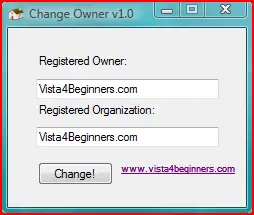
Download:
Registry de :
HKEY_Local_Machine\Software\Microsoft\WindowsNT\Current Version
'Registered Owner' degrine sag tiklayip degistir deyip istedigimiz bir ismi verelim
ilaveten sagidaki accepted solution kismini okuyunuz:
http://www.experts-exchange.com/OS/Micr ... 15100.html
cözümü okumak icin üyelik isteyebilir o nedenle ingilizcesini asagida veriyorum :
Right click on Computer and select properties Select Advanced System settings (on the left)
On the Advanced Tab, select SETTINGS under user profiles Select the old account and then COPY TO Locate the new profile folder (c:\Users\Username)
*** IMPORTANT then select CHANGE under "permitted to use" and enter "Everyone"
****then press OK and if necessay confirm the overwriting to the old profile.
Start Menu (baslat cubugunda), bilgisayarima sag tikla ve "yönet." de Local Users and Groups, altinda "Users." (kullanicilar) i secelim buradan her hesabin görüntü adini degistirebiliyor olman gerek
Asagidaki yazilim da ise yarayabilir:
Download:
Kod: Tümünü seç
http://www.vista4beginners.com/files/Change_Owner_v1.0.zipHKEY_Local_Machine\Software\Microsoft\WindowsNT\Current Version
'Registered Owner' degrine sag tiklayip degistir deyip istedigimiz bir ismi verelim
ilaveten sagidaki accepted solution kismini okuyunuz:
http://www.experts-exchange.com/OS/Micr ... 15100.html
cözümü okumak icin üyelik isteyebilir o nedenle ingilizcesini asagida veriyorum :
Right click on Computer and select properties Select Advanced System settings (on the left)
On the Advanced Tab, select SETTINGS under user profiles Select the old account and then COPY TO Locate the new profile folder (c:\Users\Username)
*** IMPORTANT then select CHANGE under "permitted to use" and enter "Everyone"
****then press OK and if necessay confirm the overwriting to the old profile.